Get to know the game
What makes Hunter: Evolve Uprising different?
Try this for squad progression. Ace Strike has a more direct loop of moving a ship through incoming targets.
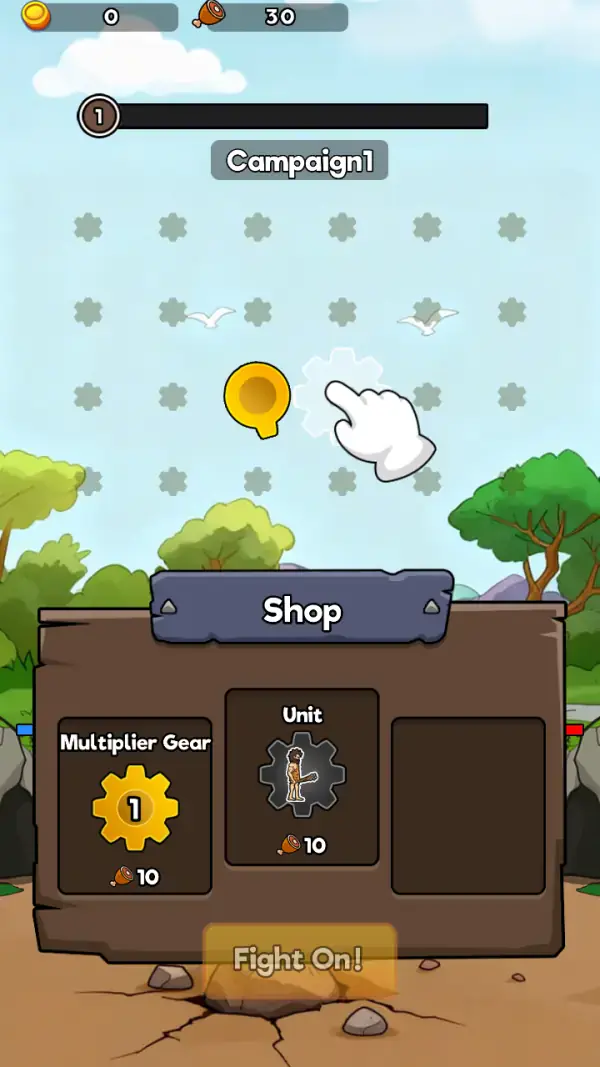
The field is a staggered grid of pale six-sided flower-shaped markers under a blue sky with clouds and acacia trees, and the only living things on it are two white gulls. A gold cup-shaped marker sits in the middle of the grid, and immediately to its right one of the flower markers is drawn in bright white with a cartoon gloved hand pointing at it — the game showing you where to tap. Above it all, a level badge reading 1 sits at the left end of a long, empty black bar, and a grey tab under it says "Campaign1".
The lower half of the screen is a wooden panel under a blue sign reading "Shop", with a small triangle either side of the word. The first card is "Multiplier Gear": a gold gear with the number 1 in its centre, priced below with a meat icon and the number 10. The second is "Unit": a grey gear carrying a bearded caveman in a skin tunic holding a club, also priced at 10 meat. The third slot is an empty dark panel. The top bar explains the pricing — a coin counter reading 0 and a meat counter reading 30, so the currency that works here is meat, not coins.
A translucent orange "Fight On!" button sits over the bottom edge of the shop panel, on cracked dirt scattered with rocks. At the far left and right edges of the panel two small bars — blue on the left, red on the right — sit over piles of grey rock. That pairing is the honest summary of the screen: you buy a multiplier and a unit with the meat you hold, then send the campaign forward.
Learn the controls
How to play
- Tap the white-highlighted marker the hand is pointing at, next to the gold cup — that is the first lesson the board gives.
- Buy the Multiplier Gear before the second Unit. At 10 meat each and a starting 30, the multiplier is what makes the next hunt pay more.
- Aim at the gulls crossing the field rather than at the pale markers; the birds are the only moving objects on the board.
- Press "Fight On!" to commit the run once the shop is settled — the button sits over the panel's bottom edge for that purpose.
- Watch the black bar beside the level badge. It is the campaign progress meter, and it starts empty at level 1.
- Track the two small bars at the edges of the shop panel — blue on the left, red on the right — since they are the only indication on screen of who is winning a bout.
A better next move
Read the board, then act.
Do not treat every counter as the same currency. Compare an upgrade’s displayed cost with the resource that actually pays for it.
Meat is the working currency
The top bar carries two counters and they are not equal: coins read 0 while meat reads 30, and both shop cards are priced at 10 meat. Anything you earn on a hunt goes into the meat column, so the coin balance staying at 0 is normal rather than a problem.
A multiplier gear that shows its level
"Multiplier Gear" is drawn as a gear with the number 1 in a circle at its centre. It starts at 1, which tells you what the first purchase is for: raising that number, which scales whatever the run pays out.
Units, and a shop with a third empty slot
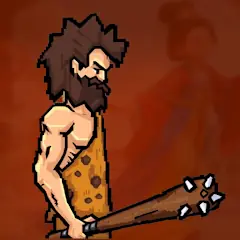
The "Unit" card shows a caveman holding a club set into a grey gear — the hunter is a purchasable body, not a fixed player character. The third shop slot is blank, so the panel has room for an offering you have not unlocked yet.
Useful habits
- The shop is open on the same screen as the board, so you can spend between shots without leaving the level.
- The gold cup marker in the middle of the grid is the one object that is not a marker or a bird — treat it as the aim point the tutorial is directing you to.
- "Campaign1" is a label, not a difficulty choice; there is only one campaign tab visible on the frame.
- A multiplier at 1 is the cheapest possible upgrade, which is why it is the first thing worth buying.
Common mistakes
- Saving meat instead of buying the first multiplier. The gear pays for itself over a campaign.
- Reading the coin counter as your budget — it is the meat column that prices the shop.
- Shooting at the static pale markers. The field is scenery; the birds are the targets.
On a phone or computer
Portrait, and it was filed as landscape in our own catalogue before this rewrite. The board occupies the upper half of the screen and the shop the lower half, so the thumb rests naturally on the purchase buttons while the targets move above them. No keyboard control appears on any captured frame — the tutorial hand is pointing at a tap.
From the hosted game
A look at the opening screens.
The gallery documents the available build’s opening screens. Menus, later levels and optional offers can vary.
A few useful answers
Before your next round
What is the currency in Hunter: Evolve Uprising?
Meat. The top bar shows a coin counter of 0 and a meat counter of 30, and both shop cards are priced at 10 meat.
What does Multiplier Gear do?
It is the first shop card, drawn as a gold gear with the number 1 at its centre and priced at 10 meat. Buying it raises that number, which scales what your hunts pay out.
What is a Unit?
The second shop card — a grey gear showing a bearded caveman holding a club, also 10 meat. The hunter you play is a purchasable unit rather than a fixed character.
Is it landscape?
No. It draws a vertical board with the shop underneath it. Our metadata said landscape; the capture contradicted that and it has been corrected.
What are Campaign1 and Fight On!?
"Campaign1" is the label on the tab under the level bar, and "Fight On!" is the translucent orange button over the bottom edge of the shop panel.